CCNA Switching Simplified: Complete Guide to DTP and VTP
Learn DTP and VTP with real-world clarity, not just theory. This guide breaks down how trunking and VLAN propagation actually work, why these protocols were created, and why modern networks often avoid them. Perfect for CCNA 200-301 preparation and practical networking understanding.
When most learners start preparing for CCNA 200-301, they naturally gravitate toward topics like IP addressing, routing protocols, and subnetting. However, switching concepts form the backbone of enterprise networking, and within switching, two protocols often create confusion — Dynamic Trunking Protocol (DTP) and VLAN Trunking Protocol (VTP).
At first glance, both may seem optional or outdated. But the reality is different. Understanding DTP and VTP gives you clarity on how switches communicate, how VLAN information propagates, and how automation in networks can both help and harm.
This blog is not just about definitions. It is about building a deep, intuitive understanding of how these protocols behave in real-world environments, why they exist, where they fail, and how modern network engineers deal with them.
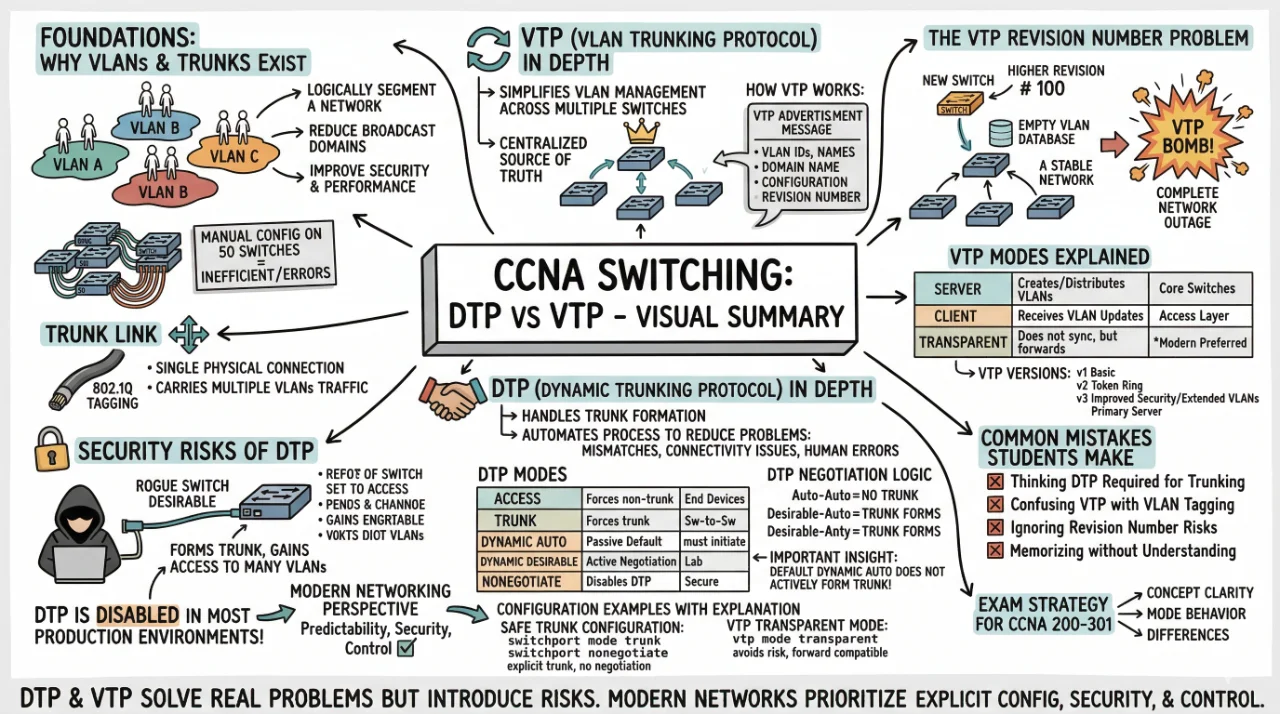
The Foundation: Why VLANs and Trunks Exist
Before diving into DTP and VTP, we need to revisit a fundamental problem in networking.
Imagine a large office network where all devices are connected to switches in a single broadcast domain. Every broadcast packet would reach every device, leading to unnecessary traffic and reduced performance.
This is where VLANs (Virtual Local Area Networks) come into play.
- They logically segment a network
- Reduce broadcast domains
- Improve security and performance
However, VLANs introduce another challenge. If you have multiple switches, how do you ensure VLAN traffic travels between them?
The answer is trunk links.
A trunk link is a single physical connection that carries traffic from multiple VLANs using tagging (802.1Q).
Now imagine configuring VLANs manually on 50 switches. This becomes inefficient. And configuring trunks manually on every port can also lead to errors.
This is exactly the problem space where VTP and DTP were introduced.
Understanding VTP (VLAN Trunking Protocol) in Depth
VTP is a Cisco proprietary protocol designed to simplify VLAN management across multiple switches. Instead of manually creating VLANs on every switch, VTP allows a centralized approach.
Think of VTP like a synchronization system:
- One switch acts as the source of truth
- Other switches automatically update their VLAN database
This might sound extremely useful — and it is — but only when used correctly.
How VTP Actually Works Internally
VTP operates by sending advertisement messages across trunk links. These messages contain:
- VLAN IDs
- VLAN names
- VTP domain name
- Configuration revision number
The configuration revision number is the most critical part.
Switches always trust the advertisement with the highest revision number, regardless of correctness.
This behavior is both powerful and dangerous.
The VTP Revision Number Problem (Real-World Scenario)
Imagine this situation:
- You have a stable network with VLANs configured
- A new switch is added to the network
- This switch has a higher revision number but an empty VLAN database
- It sends its VTP advertisement
- All switches overwrite their VLANs
Result: Complete network outage
This is known as a VTP Bomb.
This single behavior is the primary reason why many organizations avoid VTP entirely.
VTP Modes Explained with Practical Context
| Mode | Behavior | Real-World Usage |
|---|---|---|
| Server | Creates and distributes VLANs | Core switches |
| Client | Receives VLAN updates | Access layer switches |
| Transparent | Does not sync but forwards | Modern preferred mode |
In modern networks, transparent mode is widely used because it eliminates risk while still allowing VLAN forwarding.
VTP Versions (Important but Often Ignored)
- VTP v1 – Basic functionality
- VTP v2 – Adds token ring support
- VTP v3 – Improved security and extended VLAN support
VTP version 3 introduced better control, including the concept of a primary server, reducing accidental overwrites.
Now Let’s Understand DTP (Dynamic Trunking Protocol)
While VTP handles VLAN distribution, DTP handles trunk formation.
Instead of manually configuring trunk links, Cisco introduced DTP to automate this process.
Think of DTP as a negotiation protocol:
- Switches talk to each other
- They decide whether to form a trunk
Why DTP Was Created
In early networks, administrators had to manually configure trunk links on both ends. This created problems:
- Mismatched configurations
- Connectivity issues
- Human errors
DTP was designed to reduce these problems through automation.
DTP Modes Explained with Real Behavior
| Mode | Behavior | Use Case |
|---|---|---|
| Access | Forces non-trunk | End devices |
| Trunk | Forces trunk | Switch-to-switch links |
| Dynamic Auto | Passive | Default mode |
| Dynamic Desirable | Active negotiation | Lab environments |
| Nonegotiate | Disables DTP | Secure networks |
Important Insight
The default mode on many Cisco switches is Dynamic Auto, which does not actively form a trunk unless the other side initiates.
DTP Negotiation Logic (Must Understand for Exam)
| Switch A | Switch B | Result |
|---|---|---|
| Auto | Auto | No trunk |
| Desirable | Auto | Trunk forms |
| Desirable | Desirable | Trunk forms |
| Trunk | Any | Trunk forms |
This table is extremely important for CCNA.
Security Risks of DTP (Real Enterprise Concern)
DTP can be exploited.
If an attacker connects a rogue switch and sets it to desirable, it can form a trunk and gain access to multiple VLANs.
This is why DTP is disabled in most production environments.
Best practice:
- Manually configure trunk
- Disable negotiation using nonegotiate
Relationship Between DTP and VTP
Understanding how these two protocols interact is critical.
- DTP creates trunk links
- VTP uses those trunk links to propagate VLANs
Without trunk links, VTP cannot function.
DTP enables the path, VTP uses the path.
Modern Networking Perspective
In today’s enterprise networks:
- DTP is almost always disabled
- VTP is rarely used in server/client mode
- Manual configuration is preferred
Why?
- Predictability
- Security
- Control
Configuration Examples with Explanation
Safe Trunk Configuration
Switch(config-if)# switchport mode trunk
Switch(config-if)# switchport nonegotiate
This ensures:
- No negotiation
- Explicit trunk formation
VTP Transparent Mode
Switch(config)# vtp mode transparent
This avoids risks while maintaining compatibility.
Common Mistakes Students Make
- Thinking DTP is required for trunking
- Confusing VTP with VLAN tagging
- Ignoring revision number risks
- Memorizing without understanding
Exam Strategy for CCNA 200-301
Focus on:
- Concept clarity
- Mode behavior
- Differences between protocols
Do not over-focus on memorizing commands.
Final Thoughts: Practical Takeaway
DTP and VTP were designed for convenience in an era when automation was limited. While they solve real problems, they introduce new risks.
Modern networking prioritizes:
- Explicit configuration
- Security
- Predictability
Understanding these protocols is not about using them — it is about understanding why they exist and why they are often avoided.
Conclusion
DTP and VTP represent an important phase in the evolution of network automation, where the goal was to simplify configuration and reduce administrative overhead. While both protocols offer convenience by automating trunk negotiation and VLAN propagation, they also introduce significant risks, particularly in terms of security and unintended network-wide changes. For CCNA 200-301, mastering these concepts helps build a deeper understanding of how switches communicate and how Layer 2 networks operate. In real-world environments, however, best practices favor manual configuration, disabling unnecessary automation, and maintaining strict control over network behavior. By understanding both the strengths and limitations of DTP and VTP, you position yourself not just to pass the exam, but to think like a professional network engineer.
Discussion
💬 0 comments