How STP Prevents Broadcast Storms – Real Network Example Explained
Struggling with STP? This guide breaks down Spanning Tree Protocol in the simplest way with real-world examples, helping you master CCNA concepts without confusion.
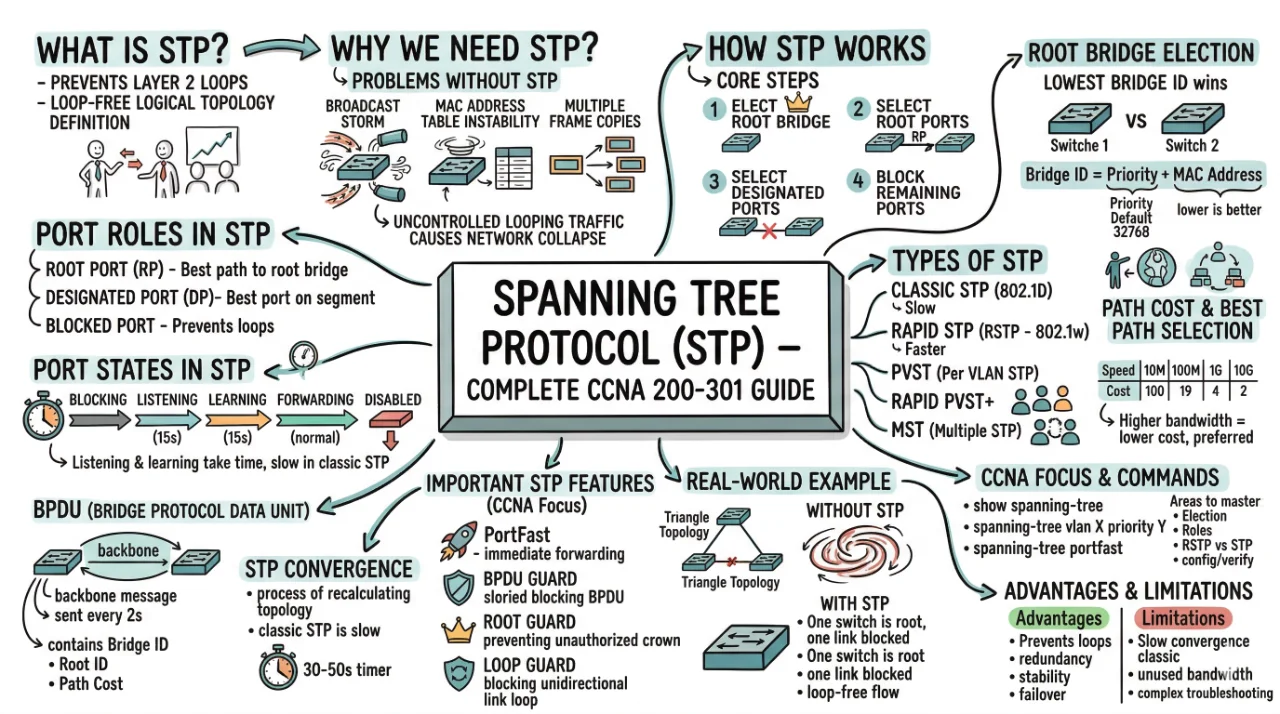
Spanning Tree Protocol (STP) – Complete CCNA 200-301 Guide
If you are preparing for the CCNA 200-301 exam, Spanning Tree Protocol (STP) is one of the most critical topics you must master. It is not just an exam concept—it is a real-world networking necessity. In modern enterprise networks, redundancy is essential for reliability, but redundancy without control leads to serious issues. STP is the protocol that brings balance between redundancy and stability.
In this detailed guide, we will go deep into STP concepts, working mechanism, port roles, states, types, and real-world understanding. By the end, you will have a solid conceptual and practical understanding of STP that goes beyond memorization.
What is Spanning Tree Protocol (STP)?
Spanning Tree Protocol (STP) is a Layer 2 network protocol designed to prevent loops in Ethernet networks. It creates a loop-free logical topology even when multiple redundant physical connections exist between switches.
In simple words, STP ensures that even if your network has multiple paths, only one active path is used at a time, while others remain as backup.
Why Do We Need STP?
In real-world networks, redundancy is important. If one link fails, another link should take over. However, redundancy introduces loops, and loops create serious problems.
Problems Without STP
- Broadcast Storm: Frames keep circulating endlessly, consuming bandwidth.
- MAC Address Table Instability: Switch keeps updating MAC table repeatedly.
- Multiple Frame Copies: Duplicate frames reach the destination.
A broadcast storm can bring down an entire network within seconds because frames keep looping infinitely between switches.
Without STP, a network with redundant links can collapse due to uncontrolled looping traffic.
How STP Works
STP uses an algorithm called the Spanning Tree Algorithm (STA) to create a loop-free topology. It does this by selecting the best path and blocking redundant paths.
Core Steps of STP
- Elect a Root Bridge
- Select Root Ports
- Select Designated Ports
- Block remaining ports
Switches communicate using special messages called BPDUs (Bridge Protocol Data Units) to share information and build the topology.
Root Bridge Election
The root bridge is the most important switch in STP. All path calculations are based on it.
How Root Bridge is Selected
The switch with the lowest Bridge ID becomes the root bridge.
| Component | Description |
|---|---|
| Priority | Default is 32768 (lower is better) |
| MAC Address | Used as tiebreaker |
Bridge ID = Priority + MAC Address. The lowest value wins.
Port Roles in STP
Once the root bridge is selected, each port in the network is assigned a role.
- Root Port (RP): Best path towards root bridge
- Designated Port (DP): Best port on a network segment
- Blocked Port: Prevents loops
Only Root Ports and Designated Ports forward traffic. Blocked ports do not forward frames.
Port States in STP
STP ports do not immediately start forwarding traffic. They go through different states to prevent loops.
- Blocking – No data forwarding
- Listening – Preparing topology
- Learning – Learning MAC addresses
- Forwarding – Normal operation
- Disabled – Administratively down
Transitions like Listening and Learning take time (usually 15 seconds each), which makes classic STP slow.
Path Cost and Best Path Selection
STP chooses the best path based on cost. Lower cost means better path.
| Speed | Cost |
|---|---|
| 10 Mbps | 100 |
| 100 Mbps | 19 |
| 1 Gbps | 4 |
| 10 Gbps | 2 |
Higher bandwidth links have lower cost, so they are preferred by STP.
BPDU (Bridge Protocol Data Unit)
BPDUs are the backbone of STP communication. Switches exchange BPDUs to elect root bridge and maintain topology.
- Sent every 2 seconds (Hello Time)
- Contains Bridge ID, Root ID, and Path Cost
If a switch receives a better BPDU (lower Bridge ID), it updates its information accordingly.
STP Convergence
Convergence is the process of recalculating topology when a change occurs (like link failure).
Traditional STP is slow because it takes around 30–50 seconds to converge. During this time, the network may experience disruption.
Types of STP
1. Classic STP (802.1D)
Original version, slow convergence
2. Rapid STP (RSTP - 802.1w)
Faster convergence using improved mechanisms
3. PVST (Per VLAN STP)
Separate STP instance per VLAN
4. Rapid PVST+
Combination of RSTP + VLAN-based STP
5. MST (Multiple STP)
Maps multiple VLANs to a single STP instance
Modern networks mostly use RSTP or Rapid PVST+ due to faster convergence and efficiency.
Important STP Features (CCNA Focus)
PortFast
Immediately puts port into forwarding state (used for end devices)
BPDU Guard
Disables port if BPDU is received (security feature)
Root Guard
Prevents unauthorized root bridge election
Loop Guard
Prevents loops caused by unidirectional links
Real-World Example
Imagine three switches connected in a triangle. Without STP, traffic will loop endlessly. With STP:
- One switch becomes root
- One link is blocked
- Network becomes loop-free
If an active link fails, the blocked port becomes active, ensuring network redundancy.
STP in CCNA Exam
For CCNA 200-301, you must understand:
- Root bridge election
- Port roles and states
- STP vs RSTP differences
- Basic configuration and verification
Common Commands
show spanning-tree
spanning-tree vlan 1 priority 4096
spanning-tree portfast
Advantages of STP
- Prevents Layer 2 loops
- Provides redundancy
- Ensures network stability
- Automatic failover
Limitations of STP
- Slow convergence (in classic STP)
- Unused bandwidth (blocked links)
- Complex troubleshooting
Quick Revision Table
| Concept | Key Point |
|---|---|
| Root Bridge | Lowest Bridge ID |
| Root Port | Best path to root |
| Designated Port | Forwarding port per segment |
| Blocked Port | Prevents loops |
| BPDU | STP communication message |
Conclusion
Spanning Tree Protocol is not just another CCNA topic—it is the foundation of stable Layer 2 network design. Without STP, redundant networks would collapse under broadcast storms and looping frames. By intelligently selecting paths and blocking unnecessary links, STP ensures both redundancy and reliability.
For CCNA 200-301, focus on understanding the logic behind STP rather than memorizing definitions. Once you clearly understand root bridge election, port roles, and path selection, everything else becomes much easier. Mastering STP will not only help you pass the exam but also make you a stronger network engineer in real-world scenarios.

Discussion
💬 0 comments