How VLAN Works in Real Networks (With Practical Insights)
VLAN is one of the most important concepts in networking, especially for CCNA 200-301 preparation. It allows you to divide a single physical network into multiple logical networks, improving performance, security, and scalability. In this guide, you will learn how VLAN works, why it is used, and how to configure it in real-world scenarios. Whether you are a beginner or preparing for certification, this article will help you build a strong foundation in switching concepts.
If you are preparing for the CCNA 200-301 exam, VLAN is one of those topics you simply cannot skip. At first, it may feel like just another theoretical concept, but once you understand how VLANs work in real networks, everything starts to make sense.
In modern networking, efficiency, security, and scalability are critical. VLANs play a key role in achieving all three. In this blog, we will break down VLANs from scratch, understand their purpose, explore how they work, and connect everything with real-world examples so that you can confidently answer exam questions and apply the concept practically.
What is a VLAN?
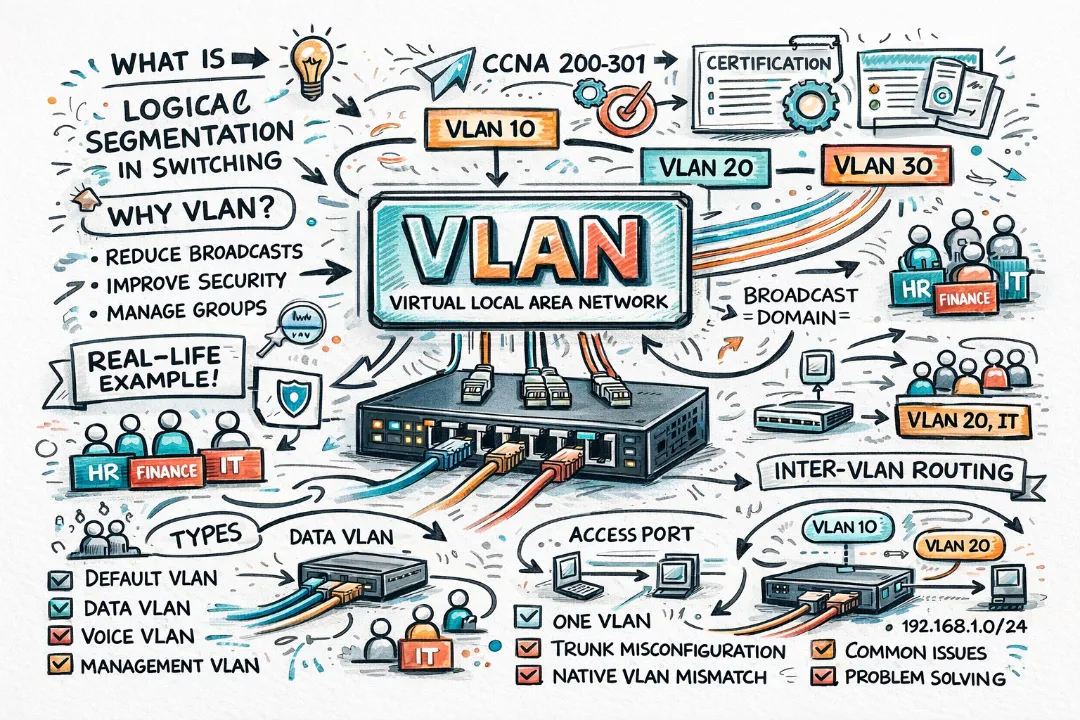
A VLAN (Virtual Local Area Network) is a logical segmentation of a Layer 2 network that allows devices to be grouped together even if they are not physically connected to the same switch.
In simple terms, VLAN lets you take one physical network and divide it into multiple smaller virtual networks.
Think of a VLAN like different departments in a company working in the same building but separated logically for better organization and security.
Normally, when devices are connected to a switch, they all belong to a single broadcast domain. But VLANs break this limitation by creating multiple broadcast domains within the same switch.
Why VLAN is Needed
Without VLANs, all devices in a LAN receive broadcast traffic from every other device. As the network grows, this creates congestion and reduces performance.
VLAN solves this problem by limiting broadcast traffic and improving network efficiency.
- Reduce Broadcast Traffic: Each VLAN has its own broadcast domain
- Improve Security: Devices in one VLAN cannot directly access another VLAN
- Better Network Management: Logical grouping of devices
- Scalability: Easy to expand networks without physical changes
A VLAN essentially reduces unnecessary traffic and keeps communication efficient and controlled.
Broadcast Domain vs Collision Domain
Understanding VLAN becomes easier when you clearly understand broadcast domains.
| Concept | Definition |
|---|---|
| Broadcast Domain | All devices receiving broadcast messages |
| Collision Domain | Where packet collisions can occur |
A switch already separates collision domains, but VLANs are required to separate broadcast domains.
How VLAN Works
VLAN operates at Layer 2 of the OSI model and works by assigning switch ports to specific VLAN IDs.
Each VLAN is identified by a number (1–4094), and devices connected to ports in the same VLAN can communicate with each other.
- Switch assigns a VLAN ID to each port
- Devices connected to that port become part of the VLAN
- Traffic is restricted within that VLAN
Even if two devices are connected to the same switch, they cannot communicate if they belong to different VLANs unless routing is enabled.
Types of VLANs
In CCNA, you should be familiar with different VLAN types.
- Default VLAN: VLAN 1, all ports belong here initially
- Data VLAN: Used for normal user traffic
- Management VLAN: Used for switch management
- Voice VLAN: Used for VoIP traffic
- Native VLAN: Used in trunk ports (untagged traffic)
Access Port vs Trunk Port
This is one of the most important concepts in VLAN.
| Feature | Access Port | Trunk Port |
|---|---|---|
| VLAN Membership | Single VLAN | Multiple VLANs |
| Used For | End Devices | Switch-to-Switch |
| Tagging | No | Yes (802.1Q) |
Access ports connect end devices like PCs, while trunk ports carry traffic for multiple VLANs between switches.
VLAN Tagging (802.1Q)
When traffic travels between switches, it needs to carry VLAN information. This is done using VLAN tagging.
IEEE 802.1Q is the standard used to tag Ethernet frames with VLAN IDs.
Tagged frames ensure that switches know which VLAN the traffic belongs to.
Inter-VLAN Communication
By default, devices in different VLANs cannot communicate with each other.
To enable communication between VLANs, we use a Layer 3 device such as:
- Router (Router-on-a-Stick)
- Layer 3 Switch
This process is called Inter-VLAN Routing.
No routing = No communication between VLANs
VLAN Configuration (Basic)
In CCNA labs, you will configure VLANs using Cisco CLI.
Switch(config)# vlan 10
Switch(config-vlan)# name SALES

Switch(config)# interface fa0/1
Switch(config-if)# switchport mode access
Switch(config-if)# switchport access vlan 10
This creates VLAN 10 and assigns a port to it.
Real-Life Example
Imagine a company with three departments:
- HR
- Finance
- IT
Instead of using separate switches, VLAN allows all departments to share one switch while keeping their traffic isolated.
| Department | VLAN ID |
|---|---|
| HR | 10 |
| Finance | 20 |
| IT | 30 |
Each department works independently even though they use the same physical infrastructure.
Advantages of VLAN
- Improved security
- Reduced broadcast traffic
- Better performance
- Flexible network design
- Cost-effective (no extra hardware)
VLAN allows administrators to design networks logically rather than physically.
Disadvantages of VLAN
- Configuration complexity
- Requires proper planning
- Needs routing for inter-VLAN communication
Common VLAN Issues
- Wrong VLAN assignment
- Trunk misconfiguration
- Native VLAN mismatch
- VLAN not allowed on trunk
These are common troubleshooting topics in CCNA exams.
VLAN vs Subnet
| Feature | VLAN | Subnet |
|---|---|---|
| Layer | Layer 2 | Layer 3 |
| Purpose | Logical segmentation | IP addressing |
Although VLANs often map to subnets, they are not the same concept.
Important Exam Points (CCNA 200-301)
- VLAN = Broadcast domain
- Operates at Layer 2
- Uses 802.1Q tagging
- Access vs Trunk ports
- Inter-VLAN routing required
Conclusion
VLAN is not just a theoretical topic in CCNA; it is one of the most practical and widely used technologies in real-world networking. It allows network engineers to design scalable, secure, and efficient networks without relying on physical separation.
Once you understand VLAN concepts like broadcast domains, access ports, trunking, and inter-VLAN routing, you unlock a major part of switching fundamentals. The key is not just memorizing definitions but visualizing how traffic flows within and between VLANs.
If you are preparing for CCNA 200-301, make sure you practice VLAN configuration in labs, because this is where theory becomes real understanding. Mastering VLAN will make your networking foundation strong and prepare you for advanced topics ahead.

Discussion
💬 0 comments