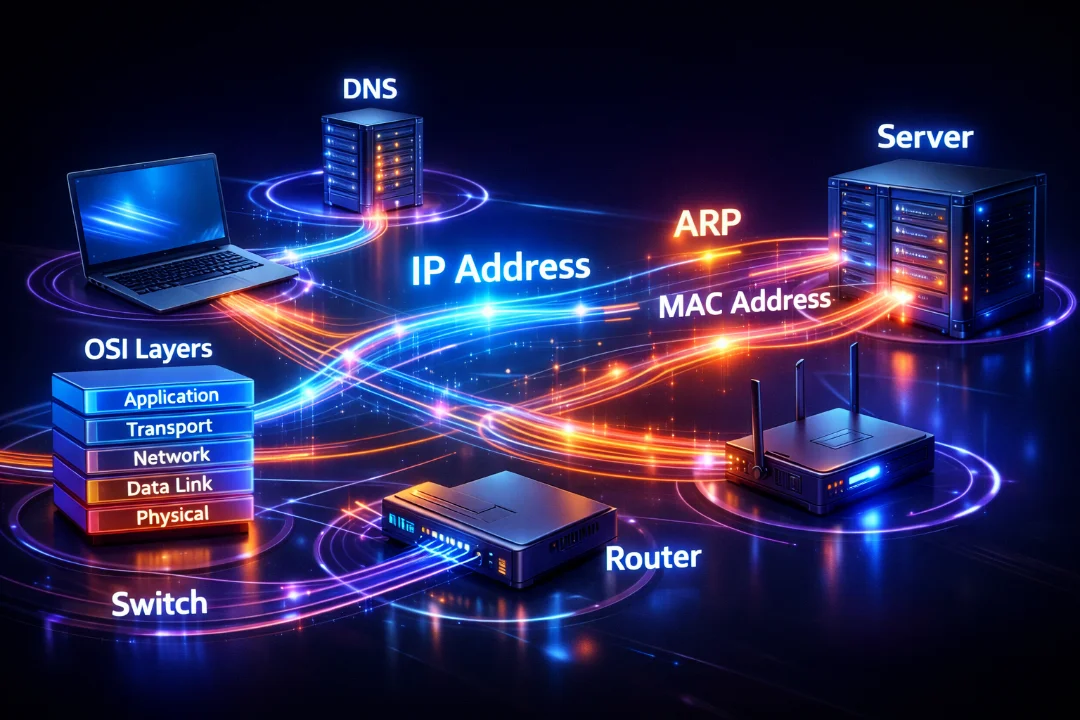
The Life of a Packet: Step-by-Step Networking Guide for Beginners
Understanding how data moves across a network is the foundation of networking. This guide breaks down the life of a packet in a simple and practical way, covering DNS, ARP, encapsulation, switching, and routing. Perfect for beginners and CCNA aspirants who want real clarity instead of just theory.
In networking, one of the most important concepts to truly understand is “The Life of a Packet.” It is not just a theoretical topic for the CCNA 200-301 exam—it is the foundation of how real-world networks operate. Every time you open a website, send a message, or stream a video, packets are created, processed, transmitted, and delivered across multiple devices.
This blog will take you deep into the complete journey of a packet—from the moment a user enters a URL in a browser to the point where the data reaches the destination server and returns back. We will explore OSI layers, encapsulation, ARP, DNS, switching, routing, and real-world packet flow in a structured and human-friendly way.
What is a Packet?
A packet is a small unit of data that travels across a network. Instead of sending large chunks of data all at once, networks break data into smaller packets so they can be transmitted efficiently and reliably.
- Contains data (payload)
- Includes headers for addressing and control
- Travels through multiple devices before reaching destination
Each packet carries enough information so that network devices know how to handle and forward it correctly.
Understanding the Scenario
Let’s consider a simple real-world example:
- A user (Host A) wants to access www.example.com
- The request must travel through switches and routers
- A DNS server is used to resolve the domain name
- The packet eventually reaches a web server
This entire process involves multiple protocols and steps working together seamlessly.
Step 1: Application Layer – Creating Data
The journey begins at the Application Layer of the OSI model. When a user types a URL into a browser:
- The browser generates an HTTP request
- This request contains the destination domain name
- At this stage, no IP address is known yet
The system now needs to resolve the domain name into an IP address before sending the packet.
Step 2: DNS Resolution
Before sending actual data, the host must find the IP address of the destination server.
- Host sends a DNS query
- Query is sent to the configured DNS server
- DNS server responds with the IP address
This is a crucial step because networks communicate using IP addresses, not domain names.
Without DNS, users would have to remember IP addresses instead of domain names.
Step 3: Encapsulation (OSI Model)
Once the IP address is known, the data moves down the OSI layers. At each layer, headers are added—this process is called encapsulation.
| OSI Layer | Function |
|---|---|
| Application | Creates data (HTTP request) |
| Transport | Adds TCP/UDP header (port numbers) |
| Network | Adds IP addresses |
| Data Link | Adds MAC addresses |
| Physical | Converts into bits for transmission |
By the time data reaches the physical layer, it is ready to be transmitted as electrical or wireless signals.
Step 4: ARP – Finding MAC Address
Even if the sender knows the destination IP, it still needs a MAC address to send data on the local network.
- If destination is in another network → send to default gateway
- Host sends ARP request (broadcast)
- Router replies with its MAC address
This process ensures proper delivery at Layer 2.
Key Concept
- IP address → End-to-end communication
- MAC address → Hop-to-hop communication
Step 5: Switching Process
When the packet reaches a switch:
- Switch checks MAC address table
- If known → forwards to correct port
- If unknown → floods to all ports
Switches operate at Layer 2 and make forwarding decisions based on MAC addresses.
Step 6: Routing Process
When the packet reaches a router:
- Router checks destination IP address
- Looks into routing table
- Forwards packet to next hop
Each router:
- Removes Layer 2 header
- Analyzes Layer 3 (IP)
- Re-encapsulates with new MAC address
Important: IP addresses remain constant, but MAC addresses change at every hop.
Step 7: Multiple Hops
In real networks, packets travel through multiple routers before reaching the destination.
- Each router performs routing decisions
- ARP may occur at each new network
- Encapsulation happens repeatedly
This process continues until the packet reaches the final destination network.
Step 8: Reaching the Destination Server
Once the packet reaches the destination:
- Server checks MAC address
- Verifies IP address
- Processes TCP/UDP port
Then the server performs de-encapsulation:
- Removes Layer 2 header
- Removes Layer 3 header
- Processes Layer 4 (TCP/UDP)
- Passes data to application
Finally, the HTTP request is processed.
Step 9: Server Response
The server now sends a response back to the client:
- Uses same process in reverse
- Encapsulation happens again
- Packet travels through routers back to source
Because ARP tables and MAC tables are already populated, the return path is faster.
Important Protocols Involved
- DNS – Resolves domain name to IP
- ARP – Resolves IP to MAC
- TCP – Reliable communication
- IP – Logical addressing
- HTTP – Web communication
Real-World Flow Summary
- User enters URL
- DNS resolves IP address
- Packet is created and encapsulated
- ARP finds MAC address
- Switch forwards frame
- Router routes packet
- Packet reaches server
- Server responds back
Key Differences: Switch vs Router
| Feature | Switch | Router |
|---|---|---|
| Layer | Layer 2 | Layer 3 |
| Uses | MAC Address | IP Address |
| Function | Forward frames | Route packets |
| Tables | MAC Table | Routing Table |
Common Interview & Exam Points
- Encapsulation and de-encapsulation process
- Role of DNS before communication
- Difference between IP and MAC addressing
- ARP working mechanism
- Routing decision process
Why This Concept Matters
Understanding the life of a packet helps you:
- Troubleshoot network issues
- Understand real traffic flow
- Configure routers and switches correctly
- Pass CCNA exam with confidence
If you understand this topic clearly, you understand how the internet works.
Conclusion
The life of a packet is the backbone of networking. From the moment a user initiates a request to the final delivery of data, multiple layers, protocols, and devices work together in perfect coordination. Concepts like DNS resolution, ARP, encapsulation, switching, and routing are not isolated topics—they are interconnected pieces of a single process.
For CCNA 200-301, mastering this concept gives you a strong foundation to understand advanced topics like VLANs, routing protocols, NAT, and network security. More importantly, it transforms your perspective from memorizing commands to actually understanding how networks function in the real world.
Once you truly grasp the life of a packet, networking stops being confusing—and starts making complete logical sense.
Discussion
💬 0 comments